Clicky

Showing posts with label VB. Show all posts

Thursday, 10 February 2011

ASPX Page Life Cycle


One of the most fundamental concepts of ASP.Net – and indeed of any transactional web development technology – is the concept of Postbacks. That is, the idea that an interactive web page may be used by inputting information via the interface presented at the client (i.e. web browser) side of the transaction, and then ‘submitting’ the page so-influenced by user input for processing by the web server. Web users are highly familiar with this concept from a user perspective – whether they’re shopping at Amazon, commenting on stories on the BBC News Site, posting threads on web forums, or whatever, it’s widely understood that in order to affect any change whatsoever with an interactive website users need to input what they want at the browser UI, and ‘post’ the page back in some way (often by simply hitting a button marked ‘submit’, but also in may other ways specific to context).

For web developers, facilitating this type of interaction with users presents many challenges, not least of which is the fact that the web is essentially a ‘stateless’ medium. Which is to say that each time an interactive web page is ‘submitted’ for processing, from the perspective of the web server it’s as if it is the first time it has interacted with the user in question, and so everything about the transaction that is being attempted must be included in the page that has been submitted (including information that, from the user’s perspective, they may have submitted several steps previously, e.g., they may have entered their Amazon user account name and password previously, and have added several items to their ‘basket’ in the meantime, but they don’t expect to have to enter their credentials again when they click ‘Purchase’ as the final step in the process – they expect the page to somehow have ‘remembered’ that they had provided that information already).

This article is about how ASP.Net handles Postbacks in a stateless medium, and focuses in particular on the .Net-specific concept of the page life cycle of an ASPX page.  


As mentioned above, facilitating interaction between website owners and website users, and between website users with one another, presents many challenges, whatever development technology you’re using. The HTTP protocol upon which the internet was originally based, and that it still relies heavily upon today, was really designed for allowing people to share ‘static’ content with one another. The web, as it was originally envisioned, allowed users to share simple text files of a fixed content with their peers. Each request for a ‘page’ would result in the exact same HTML being rendered, until and unless the publisher of that page deliberately changed the content manually. For this type of interaction, a stateless communication protocol is perfectly suitable : user requests a page, user gets that page; simple. However, that original concept isn’t how users expect the web to work any more. Today, they expect to be able to interact with, not merely consume, the content of the websites they use. Providing this type of interactivity has involved developers finding ways to allow an essentially static medium to somehow ‘remember’ individual users, and interact with them in ways that make sense within the context of those preceding interactions. ‘Remembering’ previously-encountered information in this way is known as ‘persisting state’.


The main tool that ASP.Net provides to facilitate the illusion of persisting state in interactive web pages is the concept of an ASPX page. Simply put, an ASPX page, also known as a ‘web form’, is a type of container that can hold several discrete types of object – collectively known as ‘controls’ – that allow a user to input information, or otherwise interact with the page. The types of control that can be placed in an ASPX page (which I’ll refer to simply as a ‘page’ from here on in) are many any varied. There is, for example, a particular class of objects known as ‘web controls’, which are defined in the System.Web.UI.WebControls .net framework namespace. These controls provide many ready-made interactive elements, such as text boxes, radio buttons, drop down lists, and others, that retain the values entered into them by users across different postbacks of the page. Developers can additionally create more complex interactive elements of their own design, known as ‘user controls’. User controls employ many of the same paradigms as web controls, but require more developer knowledge to build, whilst providing a greater degree of control over visual presentation for the developer. The last thing that developers should know about controls (of whatever type) is that they may facilitate custom Events, specific to the type of control. That is, they can be designed/used in such a way as to ensure that a postback occurs and that specific code runs at the web server in response to users interacting with the controls in a certain pre-defined way. E.g., textboxes may be designed to respond to users entering text in them, and buttons and images may be designed to respond to being clicked, etc.


The way that ASPX pages manage the feat of appearing to persisting data within the confines of the stateless medium of the internet is by using something called ViewState. In essence, ViewState is a special type of non-visible or ‘hidden’ control, contained within the ASPX page, whose job, amongst other things, is to keep track of all of the data entered in and required by each of the other data-dependent controls on the web form. It is the ViewState mechanism that allows a web server running Internet Information Services (IIS) to interpret the virtual ‘state’ of a page (a ‘state’ that was potentially built up over several preceding postbacks). If you ever look at the underlying page source of an ASPX page as it is rendered in a browser, you may well see something that looks like this somewhere in the middle of the HTML:


<input type="hidden" name="__VIEWSTATE" id="__VIEWSTATE" value="/wEPDwUJNjI0NjY1NDA2DxYCHgpNeVByb3BlcnR5BQMxMjNkZNsT9/JHdta88TymHVqnYrr7vzIS8vtD3DxRcAt1+MLp" />


This is the page's ViewState. It’s not visible to the user (hence the type="hidden" attribute of the input HTML element tag), but it is nonetheless very important to maintaining the illusion that the system the user is interacting with ‘remembers’ key aspects of the user’s preceding interaction, thereby providing the illusion of persisting state. The value contained in the  value="......" tag is a serialised representation of the data used by other controls in the form. There’s a lot more to ViewState, and indeed optimising it is a whole other topic in itself that I’ll perhaps write about another time. Within the scope of this discussion, though, it can be understood to be a serialised hash table, that ‘stores’ named Properties of controls on the page and their values across different postbacks of the page. There’s another type of object, known as ControlState, that performs a similar job to ViewState, but which specifically exists to track properties of controls regardless of any other settings a developer may choose to implement. The main distinction between ViewState and ControlState is that, whilst ViewState may optionally be developer-configured to be disabled, ControlState cannot; where ViewState doesn’t exist ControlState is necessary to do all the work of tracking control properties on its own.

So, to recap, ASPX pages contain various types of control, and the page itself may be submitted by users to the web server for further processing in a process known as making a postback. From the users’ perspective, making a postback conceptually involves ‘submitting’ the page, thereby performing some data-driven action, such as processing an order, making a post on a forum, etc., in a way that is abstracted from and invisible to the user. Now, let’s look at what actually happens from a developer perspective at the web server when such a postback actually takes place.

As well as allowing developers to design the visual and non-visual elements of the user interface, at design time ASPX pages also include a separate developer tool known as the Code Behind element of the page. This part of the design may be thought of as representing that part of the design that gets executed at the web server end (as opposed to anything that happens in the users’ browsers). The Code Behind part of the page facilitates interaction between disconnected users submitting pages via postbacks out in the stateless web, and those ‘back end’ parts of the system that turn those user postbacks into meaningful actions, such as facilitating transactions with underlying databases. For example, this is the part of the wider system that allows product orders placed by users on commercial websites and posts made on internet forums to be turned into records in a more permanently-stored medium, such as a relational database. The way that the Code Behind element of the page facilitates this interaction relies heavily on several of those elements already touched upon, as well as some others that will be discussed below. In summary, whenever a postback takes place, the following Events will take place in the order presented below within the Code Behind:


1.      Pre-Init
2.      Init
3.      InitComplete
4.      Pre-Load
5.      Load
6.      Control Events
7.      LoadComplete
8.      PreRender
9.      PreRenderComplete
10.  SaveStateComplete
11.  Render*
12.  Unload


*    Render isn’t an Event per se, but a Protected Method that gets called for each control on the page at this point in the proceedings.


You can ‘subscribe’ to these Events by creating an appropriate ‘handler’ in the code behind. For example, to create a handler for the page Pre-Init Event, simply enter the following code:

C#:
void Page_PreInit(object sender, EventArgs e)
{
'Your custom code here
}


VB:

Private Sub Page_PreInit
(ByVal sender As Object, ByVal e As System.EventArgs)
Handles Me.PreInit
'Your custom code here
End Sub

In VB this is slightly easier than in C#, in that you need only select the Event you want to create a handler for from the drop-down list provided in the Visual Studio IDE, as demonstrated:


In C#, you either need to type the code by hand, or use the following method:
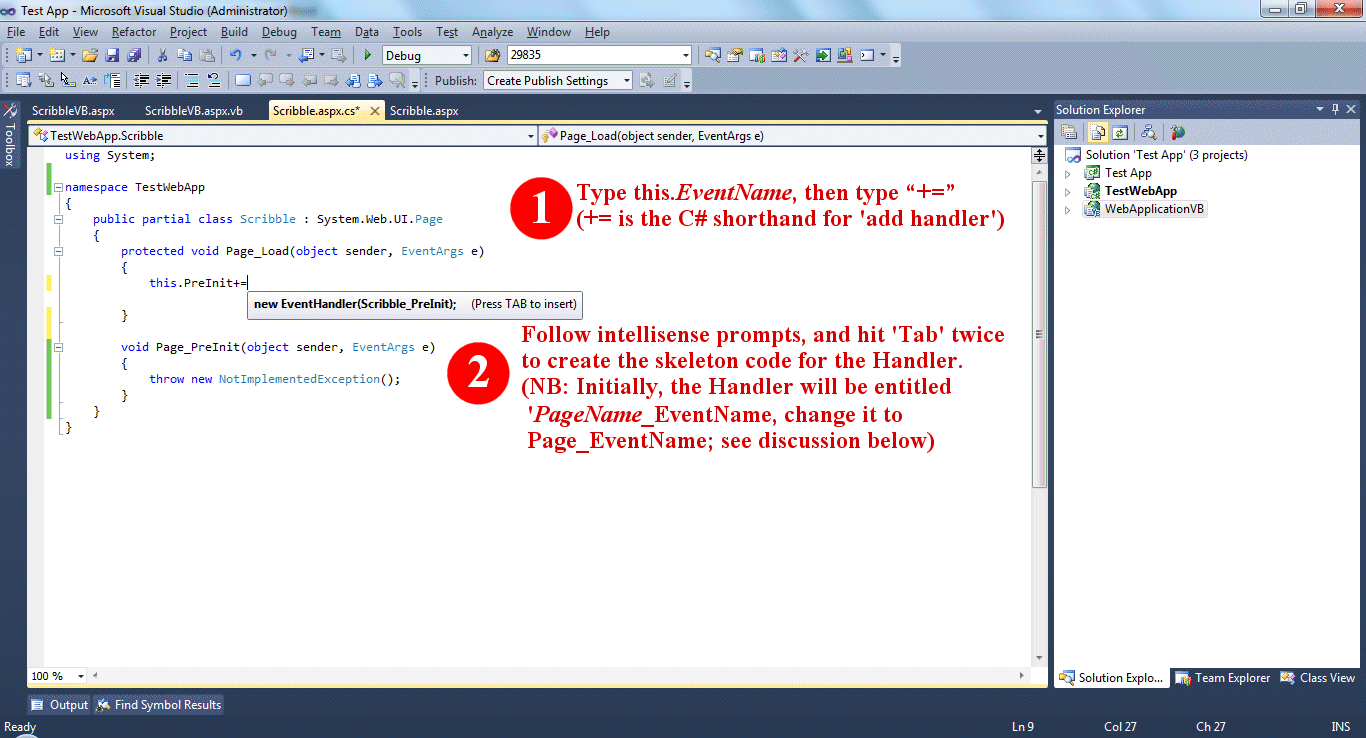


As noted in the C# version, using the above method will insert a Handler that is specific to the individual ASPX page, rather than one that is generally applicable to the System.Web.UI.Page object that all ASPX pages are based upon. This isn’t hugely problematic, but it is just a little neater and generates less code to be maintained if you rename the Handler using the nomenclature “Page_EventName” as suggested in the example, then delete the line reading:

this.PreInit += new EventHandler(WhateverYourPageIsCalled_PreInit);

that you used temporarily. You delete this line because upon renaming the Handler it becomes superfluous, because the ‘WhateverYourPageIsCalled_PreInit’ Handler to which it refers no longer exists, and because for exactly the same reason you’ll get a compilation error telling you about the Handler it refers to not existing. The reason that the “Page_EventName” Handler naming format is slightly more robust is that, provided you include the AutoEventWireup="true" attribute in the @ Page directive within the markup component of the ASPX page (and that attribute is included by default: see screen dump below), the ASPX page creates appropriate add handler code for any Page_Event handlers you define for you behind the scenes, rather than you having to maintain your own. 


The VB environment is just a little bit smarter on this occasion than the C# one, and makes use of this useful feature without having to be overtly told to do so.

Moving on, the following sections describe what each of the Events you may create handlers for actually do, and provides suggestions for when you may want to use them.


Pre-Init

By the time this event runs, certain pre-processing will have occurred that allows the developer to decide what should happen at this juncture. Certain useful page properties will have been set, including the IsPostBack and IsCallBack properties. Respectively, these properties allow the developer to know whether the page is being ‘submitted’ for the first time by a user (in which case IsPostBack will be false), and whether the ‘submit’ action was triggered as a result of client script utilising a CallBack (a sort of mini-postback, involving processing of the code behind by the server without utilising the ‘submit’ mechanism or refreshing the page, used in AJAX-enabled applications).  It’s possible in ASP.Net to submit the results from one ASPX page into the code behind for another ASPX page; if this is the case, then the IsCrossPagePostBack property of the page will be true at this stage.

As well as using the above properties to direct which Methods of your code behind to run, it’s common to use the Pre-Init handler to dynamically set any desired aspects of the page, such as setting the Theme or Master Page (both of which can affect the appearance and layout significantly), depending on the context.

It’s important to note that at this stage of the page life cycle, the controls on the page will not have had their values retrieved from the page’s ViewState yet. So, don’t use this handler to try and retrieve and act upon user input just yet.


Init

Each control on the page has an Init Event, which may be separately handled. Each of the individual controls’ Init Events will run before the page’s Init Event does.

MSDN advises to use this Event to “read and initialise” control properties, and also states that “controls typically turn on view state tracking immediately after they raise their Init event”. Be advised, however, that when I double-checked the actual behaviour under Framework version 4 and IIS 7 for writing this article, the specific behaviour I observed appeared to be as follows:


·        You may validly set properties of controls during this Event only where the current page is not experiencing a PostBack (i.e., provided that this is the first time the user has submitted this page). Where you do initialise any properties here, you may expect those properties you initialise to be persisted to the control/page sent to the client during the first time the page is loaded only. i.e., if you set the ‘Text’ Property of a textbox during this Event, whatever you set that ‘Text’ Property to will be shown on the page as seen by the user, during the first processing of the page only, but not during any subsequent postbacks.

·        ViewState is made active for individual controls during their own individual Init events, but be advised that setting values in ViewState directly is not possible within the Init event. NB: this is usually done to model generic ‘Properties’ within code behind pages, and the syntax takes the form:

     
ViewState("MyProperty") = "123"          (VB) 
     
ViewState["MyProperty"] = "123";                (C#).


·        If you set default values for control properties in the ASPX page Markup, you can read those initialised properties during this Event. Any dynamically-initialised properties of user controls may also be read here (which might be important, depending on what you intended your user control to do). However, please note that whilst the above is all well and good, other behaviour observed during this event is a bit odd and counterintuitive. Specifically, you should be aware that, if this is a postback, and if the user has set a Property of a control, that user-set control property will not yet reflect the value contained by the control during this Event. Even worse, during this event any user-set controls will incorrectly appear to show the initial values they held when the page was ‘new’; so, control properties are not merely missing, but misleading and incorrect, during postbacks. Please remember this fact, and surround any code you may place within the Init event handler within a  if (Page.IsPostBack)  block to ensure that it behaves as you intend during all stages of the page’s life cycle.


InitComplete

Between the Init and InitComplete Events precisely one thing happens: ViewState tracking gets turned on. So, using the

ViewState["MyProperty"] = "123"

syntax mentioned earlier will cause values to be ‘permanently’ persisted to ViewState during this Event.


PreLoad

MSDN says that this Event runs after the page loads ViewState for itself and all child controls on the page. As noted above, however, I found that ViewState had already loaded during InitComplete. All postback data processing should have been completed by the time this Event runs.


Load

The page’s own Load Event runs, then the Load Event for each individual control on the page runs. Event handlers for the page and individual control’s Load events may be reliably used to set control properties programmatically during postbacks.

Load Event Handlers are a good place to initialise and open any database connections that may be required for further processing during the next stage.


Control Events

Individual control Event Handlers will run at this point in the page’s processing. So, if you’ve created a TextChanged event handler for a TextBox, this is the point in the page’s life cycle where that handler’s code would run.


LoadComplete

LoadComplete runs for the page only, not for individual controls. Place any code that relies on individual control event handling to be complete here (e.g., you may have code that determines whether a ‘Complete Transaction’ button is enabled here, depending on whether all necessary data has been entered in other controls first).


PreRender

An important part of what an ASPX page does is that it dynamically generates HTML markup pertinent to the present state of the page and its constituent controls (remember that discussion about how the web was originally conceived to be a static medium earlier? – well, it still is, and dynamic rendering of HTML in this way is the part of the whole ‘page life cycle’ process that makes it appear that a static medium is capable of generating interactive content based on user input). At this stage in the cycle, all controls have been added to the page, have been updated with the latest data from user input and server-side processing, and are ready to be rendered as HTML.

This Event may be used to make any final changes to control properties before final rendering takes place.


PreRenderComplete

This Event fires just after all data bound controls whose DataSourceID property has been set call their DataBind methods. Data Binding is outside the scope of this article.


SaveStateComplete

The SaveStateComplete Event fires after ViewState and ControlState have been finalised. MDSN advice says that any changes to controls made during or after this Event will be rendered, but will not be persisted during the next Postback. I didn’t find this to be the case – for example, setting the ‘Text’ property of a TextBox during this event will both change what gets rendered in the textbox when the page is presented to the user, and will persist the value set through to the next postback (and beyond). It just goes to show, it pays to check advice, even advice from the horse’s mouth, with each new release of the framework and IIS.


Render

Render isn’t an Event that can be handled, but a Protected Method that exists for each control on an ASPX page, that gets called for each control on the page at this point in the proceedings. This is the Method that is used to output the actual HTML that has been dynamically generated from all the foregoing processing within the page. The ASPX page passes a Framework object called a HTMLTextWriter into the Method as an argument. That HTMLTextWriter contains the page’s calculated HTML output specific to the present context of the control. 

In 99% of all cases, the HTML generated by ASP.Net will be smart enough to ensure that what the developer intended to be presented to the user is what actually gets sent. However, there are a small number of cases where pages are just a little too complex, or where the evolving capabilities of the evermore complex browsers that are continually being developed falls out of sync with the most recent version of the .Net framework, leading to the ASP.Net rendering process sending HTML that is inappropriate for a particular user’s setup. In these cases, the Render Method may be overridden by the developer.

The following example shows one way of overriding the Render Method, that I used on a live project recently. The basic crux of the problem was that the ‘name’ attributes of the HTML tags rendered by the ASP.Net engine were of a particular format, and, for the purposes of working in harmony with another solution that I didn’t have access to the source code for, those name tags had to take on a different naming convention. I tried a couple of approaches, but the one that produced the most satisfactory results is reproduced below. The basic jist of the solution is that the Render Method is overridden in my custom user control, and HtmlTextWriter object that the Render Method takes as input from the ASPX page is tinkered with to ensure that each of the name attriubtes inserted by the ASP.Net engine is replaced by deliberately-set name tags chosen by the developer instead:

protected override void Render(HtmlTextWriter writer)
{
    if (QuestionLabel != String.Empty && RenameControlsAsPerQuestionLabel == true)
    {
        StringBuilder sb = new StringBuilder();
        StringWriter sw = new StringWriter(sb);
        HtmlTextWriter hw = new HtmlTextWriter(sw);

        base.Render(hw);

        if (ResponseControlType == ControlTypeEnum.CheckboxGroup)
        {
            foreach (ResponseOption o in AvailableResponses)
            {
                sb.Replace(
                    "name=\"" + o.ResponseCheckBoxForCheckBoxGroupTypeQuestions.UniqueID + "\"",
                    "name=\"" + o.ResponseControlName + "\"");                
            }
        }
        else
        {
             sb.Replace("name=\"" + responseCtl.UniqueID + "\"", "name=\"" + QuestionLabel + "\"");
        }

        writer.Write(sb.ToString());
    }
    else
    { 
        base.Render(writer);
    }
}
The times when developers should need to override ASP.Net’s natively-generated HTML are few and far between, but it’s useful to know how to do this should it be required.


Unload

The last thing that happens before the processed page gets output to the user that submitted/requested it is that the Unload Event gets called for each control on the page, then for the page itself. This is the best place to close any open connections to databases or files at the server side (either in the page level event for general connections, or in control-level Unload events where a specific control has exclusively used a particular resource during the processing of the page).


That’s pretty much it for the page life cycle. It should be noted that the life cycle for a CallBack is slightly different, but similar in most of the important respects noted above (the main difference is that Callbacks don’t involve submitting the whole page for processing, only discrete elements of it, and that consequently ViewState is therefore unaffected by Callbacks). It’s pretty amazing to think how much innovation and ingenuity has gone into making what was originally a static document delivery system into the fully-interactive medium that it’s since become.

Thursday, 12 August 2010

Structs and Classes


.Net provides two basic object types that can be used to construct more complex objects: Structs and Classes. These object types are made up of similar features, and can be used to fulfil many of the same tasks as one another. There are, however, some important distinctions between what you can do with Structs and with Classes, and between how similar features are implemented differently by each object type. This article describes those similarities and differences, and provides some suggestions for when and how to use each type.


The Similarities


Structs and Classes are both capable of utilising Fields, Properties, Constants, Methods, Events, Handlers and certain types of Constructor. They are both capable of being instantiated, and they are each able to have variables declared as being of the type they define. Both can model data objects, using much the same syntax in each case, and indeed you can often convert a Struct to a Class and back simply by changing the word struct in its definition to class, or vice-versa. Both types of entity may also implement Interfaces.


The Differences


The most fundamental distinction between Structs and Classes is rooted in a .Net concept known as the Common Type System. When you compile a program written in any of the languages that target the .Net Framework, the first step that happens is that the code gets converted by the specific compiler for the high-level language (e.g., C#, VB, C++, or whatever) into something called Microsoft Intermediate Language (also known as the Common Intermediate Language, often abbreviated to ‘IL’ for short). The IL representation of a .Net program is then converted into a set of platform-specific machine code instructions by the .Net runtime execution environment, known as the Common Language Runtime (CLR).  [ NB: For Java developers, the concept of .Net’s IL is analogous to the way that Java compilers convert raw Java code into Bytecode, to be run within a Java Virtual Machine.] 

Part of what makes the process of converting any of the languages that target the .Net Framework into IL possible, is the fact that each of those different languages uses the Common Type System (CTS) mentioned above. The CTS defines the basic set of types (boolean, integer, etc) that IL understands and knows how to work with. [Actually, the set of types that IL understands is far larger than any of the languages that presently target the .Net Framework is capable of modelling, and not all of the languages that target the .Net Framework implement exactly the same subset of those IL types, leading to the potential for subtle language interoperability issues, but that’s a discussion for another day.]

The key point of relevance to the subject under discussion is, there are two core types defined within the CTS, which are known as Value Type and Reference Type respectively. Every type in any .Net program derives from one or other of these two possible base types, and which one they derive from dictates how they will be stored in memory, how the object may be inherited, and how objects that are of those types will behave.

Getting back to Structs and Classes, it’s the case that every Struct defined in a C# or VB program is considered to be a Value Type by the CTS, and every Class is considered to be a Reference Type at the very root of its inheritance chain. This difference in base type inheritance is what accounts for many of the differences between Structs and Classes, which are listed below:


Differences in Implementation Inheritance


As noted above, both Structs and Classes may implement Interfaces. However, only Classes may overtly use Implementation Inheritance to inherit from another object. Classes, unlike Structs, may also be inherited by another object.

At their root, Structs derive from a CTS type called System.ValueType, which in turn inherits from System.Object. Classes with no overtly-defined base inherit directly from System.Object (and, for Classes that don't inherit directly from System.Object, there may be any amount of Classes in between System.Object and themselves).

Concentrating on Structs, you may find it surprising to know that most of the defined system types in C# and VB (e.g., integer, double, decimal, etc), also derive from System.ValueType, and are in fact implemented as Structs. If you mouse over the keyword of any data type implemented in this way within C# or VB, this fact becomes readily apparent:


System.ValueType doesn’t add any functionality to Structs that is not also available to Classes through their common inheritance from System.Object, but it does replace some of the functionality present in System.Object as virtual methods with implementations that are more appropriate for Structs.

Structs, in short, are intended to be used for tasks that require allocating small, fixed-size chunks of data, that need to be able to be accessed and changed rapidly, without incurring an undue performance hit in managing the memory resources that are allocated to them. That’s why they’re used to implement the basic data types such as integer, etc. : when a developer defines an integer variable, they expect to be able to begin using that variable to store numbers within the permitted range for that type immediately, without needing to mess around with allocating space in memory by using a new() operator as a separate activity each and every time, and without checking whether any modifications their application makes to the value stored in the variable has had any implications for the amount of memory required. They want to be able to access any values placed in their variable readily, without having to rely on the underlying implementation to use pointers to look up an address in memory, then decide what has been stored there, as a two-stage process. Structs enable developers to achieve this rapidity of declaration and access to memory chunks of a fixed size, but the trade-off is that they can’t be used to achieve true Implementation Inheritance, which would require management of an area of memory of a variable size.

So, whilst Structs are easy to consume and fast to access, if you need to use Implementation Inheritance, that’s a clear sign you need to use a Class instead.   


Structs can be consumed without explicit instantiation, Classes cannot


When you create a variable of a type defined by a Class, you need to use the new() operator to instantiate that object before you can access the properties of the object  the variable represents. With Structs, this is not the case. Take the following simple example, using a struct:

public class StructsAndClassesDemo 
{
    static void Main()
    {
        MyStruct myVariable;
        myVariable.SomeInteger = 1;
        Console.WriteLine(myVariable.SomeInteger);
    }
}

public class MyClass 
{
    public int SomeInteger;
}

public struct MyStruct 
{
    public int SomeInteger;
}

This will compile and run correctly, outputting “1” in the Console window. If, on the other hand, we change the Main() Method to:


a compilation error will occur, since we have tried to use an uninstantiated variable of a Reference Type.

NB: You still need to instantiate an object of type struct before you may access Properties (as distinct from Fields) of that object.


Variable Assignment works differently for Classes than for Structs


Because Structs are Value Type objects, variables of types defined by Structs behave somewhat differently than variables of types defined by Classes. Consider the following simple program:

public class StructsAndClassesDemo 
{
    static void Main()
    {
        MyClass myVariable1 = new MyClass();
        MyClass myVariable2;

        myVariable1.SomeInteger = 1;
        myVariable2 = myVariable1;
        myVariable1.SomeInteger = 2;

        Console.WriteLine(myVariable2.SomeInteger);
        Console.ReadLine();
    }
}

The above example would output “2” in the console window.  If we instead exchange the usage of a Class type object for a Struct, and keep the variable assignment logic exactly the same:

public class StructsAndClassesDemo 
{
    static void Main()
    {
        MyStruct myVariable1;
        MyStruct myVariable2;

        myVariable1.SomeInteger = 1;
        myVariable2 = myVariable1;
        myVariable1.SomeInteger = 2;

        Console.WriteLine(myVariable2.SomeInteger);
        Console.ReadLine();
    }
}

The revised program will output a “1” in the console window instead.

This highlights a key difference in the way that Value Type and Reference Type objects are treated in memory. Reference Type objects (in this case, Classes) actually represent a pointer to an address in a part of the computer’s memory known as the Heap. When assigning one variable to be equivalent to another variable, as happens in the line  myVariable2 = myVariable1, what happens in the case of the variables concerned being of a Reference Type is that it is the pointer to the relevant address on the Heap that gets copied to the variable being assigned to, not the actual data that is contained at the address itself. An upshot of this is that when the variable that has been assigned from, in this case myVariable1,  subsequently gets updated so that its SomeInteger field takes on the value “2”, myVariable2 in effect gets its value updated as well, since it is the object that resides at the location in memory that is being pointed at by both myVariable1 and myVariable2 that has been modified.

Values associated with variables of Value Types such as Structs, are stored in a different place in memory, known as the Stack. In the case of Value Types, assigning one variable to be equivalent to another does copy the actual data from the object being assigned from to the object being assigned to. Because of this, when the object that has been assigned from is subsequently updated, the effect of this change is not felt by any variable that had previously been assigned to by that variable. This is why the value “1” is returned in Console window in the second example above, in contrast to what happens when the types being considered are Reference Type variables based on custom Classes.


Classes can have overt Parameterless Constructors, but Structs cannot


As was mentioned earlier, you can use a Struct without explicitly instantiating it using the new() operator. It’s also the case that you may use the new() operator if you wish (which has the effect of instantiating the whole object for use, including any Fields the Struct may contain, by calling an instrinsic parameterless Constructor for the Struct). However, when you’re designing a Struct, it is erroneous to overtly define a parameterless Constructor for the Struct, since one is declared behind the scenes by the C# or VB compiler for you. You may still create additional Constructors that do take parameters. So, whilst the Constructor:

public class MyClass 
{
    public MyClass()
    {
        SomeInteger = 99;
    }

    public int SomeInteger;
}

is fine in a class, a similar Constructor for a struct would result in a compilation error. You may only provide a parametered Constructor for a Struct, like so:

public struct MyStruct 
{
    public MyStruct(int intialIntegerValue)
    {
        SomeInteger = intialIntegerValue;
    }

    public int SomeInteger;
}

The reason for disallowing overtly-defined parameterless Constructors in the case of Structs is that the CLR, as part of that trade off of rapidity of access for completeness of memory management mentioned earlier, does not guarantee to call such Constructors for Value Types, and so any code you place in such a parameterless Constructor would not be guaranteed to run once the program was fully compiled. This is down to the same phenomenon that makes it possible for the Fields of Structs to be accessed and set without initialisation; if the compiler spots an optimisation for your code such that you are only accessing the Fields of a variable that is of a type defined in a Struct, it will not bother generating the IL to call the Constructor for that Struct, and will instead make assumptions that the Fields you are accessing will contain meaningful values. Curiously, if creating the IL directly yourself, it would be perfectly possible to create a parameterless Constructor, and have it run every time, regardless of any apparent optimisation that may be possible, but then if you had a task that required a Constructor to run every time, that’d be a pretty clear sign that what you really needed to use was a Class. For now, in the trade off of best speed for true object orientation in the case of Structs, the designers of the VB and C# languages have decided to take the simplest route, and have prevented parameterless Constructors from being defined for Structs altogether.

You cannot initialise a field within the definition of a Struct


Both Structs and Classes can have Fields. In the case of Classes, it is possible to give a Field an initial value within the definition of the Class itself, like so:

public class MyClass 
{
    public int SomeInteger = 99;
}

Trying to do the same within the definition of a Struct, however, will produce a compilation error:


The reasons behind this difference in the way that Structs and Classes are permitted to operate cuts right to the heart of the different ways these distinct types of object are treated in memory. For Classes, because their values are physically stored on the hardware’s Managed Heap, and because .Net’s Garbage Collection mechanism deals with managing resources on the Heap, the CLR can guarantee to have cleared the area in which objects defined by Classes will be stored before placing any new object in that area. Because of the Garbage Collection process, the CLR can be sure that the Properties and Fields of any objects defined as Classes will either be null, or that any values they do hold will have been deliberately assigned to them. CLR is therefore happy to have Class –type objects that have a mixture of assigned and as-yet-unassigned Fields and Properties.

The Stack, on the other hand, where Structs are stored, is much less well managed (and, as a trade-off, it is generally much quicker to access and modify resources placed there). However, because there is no Garbage Collection process going on in the background to manage that area of memory, Structs will generally be assigned to a random area of the Stack, big enough to contain the Struct, but where the CLR cannot guarantee that any values placed in that area of the Stack have been deliberately assigned to the Struct that now resides there, or whether the area in memory that happens to currently be assigned to a given Field or Property of a Struct was actually a piece of data from another unmanaged object that was left behind when that object was cleared from the Stack at some prior point.

In an effort to mitigate the uncertainty about the whether parts of a Struct have been deliberately set or are merely a throwback from prior use of the same location of the Stack by some other unrelated object, Structs are restricted to having their fields initialised in a certain controlled way, that can be efficiently checked by the compiler. If you use the implicitly-defined Constructor, new MyStruct(), to create a new instance of a Struct, this has the effect of setting all of the Struct’s Fields and Properties to their default values (so, 0 for int -type Fields, etc). If you define your own parametered Constructor for a Struct, the compiler will warn you if you fail to initialise any of the Struct’s Fields within that custom Constructor:


As mentioned earlier, you don’t need to initialise a Struct at all before you begin to assign values to it. If you do use a Struct –type object in this way, and you fail to assign a value to one of the Fields of that Struct variable before assigning the value of that variable to another variable of the same type, you will also get a compilation error:


By removing the possibility that Fields may be set within the definition of the Struct itself, it allows the compiler to efficiently focus on other more straightforward possible places (i.e., within a Constructor, if one is used, or within the scope of a variable defined to be of the type the Struct declares, if no Constructor is used), to determine whether all of the Fields of a Struct-type object have been fully initialised before those Fields can be accessed by or assigned to any other object.

Structs may not have a Destructor


Because instances of Structs exist on the Stack and not on the managed Heap, the concept of Destructors (i.e., an overt override of the Garbage Collection mechanism to allow the developer to specify how to dispose of temporary resources) clearly does not apply to them:


So, in summary, the differences between Classes and Structs are:

·        Classes are Reference types, whilst Structs are Value Types.

·        Classes are physically stored on the Managed Help, whilst Structs are stored on the Stack.

·        The effect of variable assignment works differently for Classes and Structs.

·        Both types of object can implement Interfaces, but only Classes may overtly employ Implementation Inheritance.

·        Structs cannot have overt parameterless Constructors, Classes can.

·        When you define your own parametered Constructor for a Struct, the compiler enforces that you must explicitly set the value of any Fields within that Constructor to avoid said Fields containing spurious values. For Classes, the compiler entrusts the Garbage Collection process with this task.

·        You must instantiate a variable based on a Class, whilst you may instantiate an object based on a Struct (though you don’t have to).

·        Structs may not have default values for Fields, Classes may.

·        Where you choose not to instantiate a Struct –type variable, the compiler will enforce that you must set each Field of that instance of the Struct before you can use the variable for assignment.

·        Structs may not utilise Destructors.


Because of these different characteristics, Structs should be used most often for small structures, where the values contained therein will not be frequently re-assigned between variables, thereby creating a lot of duplicate data in memory, and where there is no need to use Implementation Inheritance.

Classes should be used where a more complex object that will be frequently passed around between parts of the program needs to be modelled, and in instances where it doesn’t matter that assignment between variables copies a reference to the object being assigned from, rather than the underlying data of the object itself being assigned.

Wednesday, 21 July 2010

Extension Methods


Extension Methods were introduced in the revisions to the C# and VB .Net languages that accompanied the release of Framework version 3.5 in November 2007 (that is, C# 3.0 and VB 9.0 respectively). They allow developers to augment – to extend – existing classes and interfaces by facilitating the creation of new Methods, without breaking the encapsulation of the original type/interface being extended. This can be achieved without the developer having to create a whole new type that derives from the type they wish to extend, and without their needing to have access to or know about the internal implementation of the type/interface they are extending. Used sparingly and intelligently, Extension Methods can be an extremely powerful and useful technique in a developer’s repertoire. This article contains a brief background on the advent of Extension Methods, a discussion of the syntax for implementing them, and some suggestions as to where and when best to use them.


A little background...

It’s no accident that Extension Methods were first included in the same version of the .Net Framework that also introduced LINQ. A full discussion of LINQ and the capabilities that it appends to the .Net language is a separate topic for another time. In summary, though, and of relevance to the present topic, LINQ (Language Integrated Query) is a syntax extension of the .Net languages that allows types that implement certain existing Interfaces to be directly queried in a native language syntax that reads very much like the SQL statements that had hitherto traditionally only been used within DBMS such as SQL Server. Using LINQ, developers could for the first time query, sort, and otherwise work with types representing data collections in-memory. The following simple program demonstrates LINQ at work on a collection of type string[] :


using System;
using System.Linq;

namespace Demo
{
    static class Program
    {
        static void Main()
        {
            string[] _CapitalCities = new string[5] { "Edinburgh", "London", "Paris", "Rome", "Stockholm" };

            foreach (string city in _CapitalCities.OrderByDescending(city => city))
            {
                Console.WriteLine(city);
            }

            Console.ReadLine();
        }
    }
}

The above program produces a Console window, listing the five cities stored in the variable _CapitalCities in reverse alphanumeric order. It does this by accessing a new method for type string[] called OrderByDescending. If you remove the using System.Linq directive from the above program, you will find that the compiler no longer recognises a Method called OrderByDescending for objects of type string[]. So what’s going on?

Because the type string[] implements an existing generic interface called IEnumerable<T> that was defined in previous versions of the .Net Framework, and because a new class called System.Linq.Enumerable that was appended to Framework 3.5 by the designers of LINQ defines an Extension Method for IEnumerable<T>called OrderByDescending, variables of the type string[] acquire the new Method observed, which is only accessible within the context of any object that references the System.Linq namespace.

LINQ uses Extension Methods in this way to facilitate adding new functionality to existing Framework definitions such as IEnumerable<T>, for the purpose of enabling objects that utilise those definitions to be instantly usable in conjunction with the new LINQ syntax. Extension Methods allowed them to do this without causing breaking changes to designs that preceded LINQ, and which consumed the original, un-extended versions of those existing Framework objects. Alternative approaches by the designers of LINQ might have included updating all of the Interfaces that they wanted to add new functionality to (which would have been great for LINQ, but would have broken any existing designs that had used previous versions of the updated Interfaces as soon as those designs were upgraded to the new version of the Framework, thereby upsetting a lot of developers and system owners). Or, they could have created an entirely new set of Interfaces, based on the originals, but with the extra LINQ goodness included (would have needlessly added to the complexity of the .Net Framework, which already contained quite enough redundant but kept-for-reasons-of-backward-compatibility features and near-identical object definitions from earlier upgrades and improvements, and would furthermore have needlessly rendered LINQ unusable by existing objects that had implemented older versions of the superseded Interfaces). By using Extension Methods, the LINQ developers were able to add functionality to existing objects, in a way that would only be apparent within designs that utilised their new language feature, and that avoided producing unnecessary breaking changes for developers that were merely upgrading their designs to the latest version of the Framework, but who had no interest in utilising LINQ within their legacy designs. In the process of their work, the LINQ developers gave us a useful additional tool to make much the same subtle enhancements to our own established designs as they had to the preceding version of the Framework.


Implementing Extension Methods within your own designs...

The syntax of implementing Extension Methods for a given class is demonstrated below. Suppose you have an existing class defined in the following way:


namespace RPPClassLibrary
{
    public class Person 
    {
        public Person()
        {
        }

        public string FirstName { get; set; }
        public string LastName { get; set; }
    }
}

If you wanted to extend the class Person to include a new Method called FullName using Extension Methods, the syntax for doing so would be as follows:


using System;
using RPPClassLibrary;

namespace RPPConsumingAssembly
{
    static class Program
    {
        static void Main()
        {
            Person aRachel = new Person() { FirstName = "Rachel", LastName = "Pierson" };
            Console.WriteLine(aRachel.FullName());
            Console.ReadLine();
        }

    }

    public static class MyExtensions
    {
        public static string FullName(this Person pExistingObject)
        {
            return pExistingObject.FirstName + " " + pExistingObject.LastName;
        }
    }
}

The above scenario, where the developer has free access to the class they are extending, isn’t a particularly good example of when Extension Methods should be used, but it is nonetheless a simple enough scenario to demonstrate what the syntax for creating such a Method should look like. The above code snippet takes an existing class, Person, which resides within the namespace RPPClassLibrary, and extends it to include the newly-required Method FullName, only for objects of type Person that are defined within the scope of the separate namespace RPPConsumingAssembly. This is achieved by adding a new static class within RPPConsumingAssembly called MyExtensions. The Main Method of the class Program within RPPConsumingAssembly demonstrates using the new FullName Extension Method with an object of the freshly-extended Person type. The output of the program above is as follows:


To create an Extension Method for any existing class or interface, as the code snippet above demonstrates you need to create a static class at the top level of the namespace in which you want to consume the Extension Method, then create as many public static Methods within that static class as you wish to create Extension Methods for. It doesn’t matter what you call the static class that you use to contain the Extension Methods you define, it matters only that the parameter list for any Extension Methods you define within your top-level static class take the exact format shown above – i.e. (this Person pExistingObject) – changing the type Person for whichever class/interface it is that you are extending. You can include Extension Methods for entirely different existing types within the same top-level static class, provided your definition of each individual Extension Method makes it clear which type your new Method applies to.


When to use Extension Methods...

There is a school of thought that says: “Never!”. The reason for this viewpoint is that extending classes willy-nilly certainly could lead to confusion at a later date, if the class that is extended by Extension Methods subsequently gets directly updated at some point to contain some additional intrinsic Methods with the same signatures as the Extension Methods that have been defined in the interim by external consuming classes. There would be nothing in the compiler that would alert the original author of the class being reviewed to the fact that some consumer of their object had previously extended it in what would in some respects be a potentially conflicting change. What would happen in actuality if the developer of a since-extended class happened to add a new Method to their class that had exactly the same signature as an Extension Method that had been created by a consumer, is that the new internal Method would take precedence, and the Extension Method would be superseded and effectively ignored by the compiler. For example, imagine if the original class in the simple example presented earlier were to be revised at some point so that it looked like this:


public class Person 
{
    public Person()
    {
    }

    public string FirstName { get; set; }
    public string LastName { get; set; }
    public string MiddleName { get; set; }

    public string FullName()
    { 
        StringBuilder _FullName = new StringBuilder();

        _FullName.AppendFormat("{0} {1} {2}", 
            FirstName ?? "(No First Name)",
            MiddleName ?? "(No Middle Name)",
            LastName ?? "(No Last Name)");

        return _FullName.ToString();
    }
}

In this scenario, the assembly that consumes the Person class (which would still contain a now-obsolete Extension Method with the same name as the new internal Method FullName that has been added to the original Person class) would still compile, and the program would run without errors, but the output would now reflect the internal, subtly-different, definition of the FullName Method:


The basic issue that some developers have with Extension Methods is that, by some definitions, they break the key object-oriented design principle of encapsulation. That is, they begin to impact upon the ability of objects to contain and control their own definitions, and act as black boxes to consumers. This isn’t an entirely fair criticism since, as the above example demonstrates, the original object remains quite untouched by any external consumers implementing their own Extension Methods for their own internal consumption; there’s nothing about such Extension Methods that prevent the developer of the original object from continuing to be in full control of their object’s design (though there is certainly an impetus on the developer of any Extension Methods to consider the possibility of unexpected behaviour should any object they have extended subsequently have its design changed).

The encapsulation issue aside, as the historical example of the introduction of LINQ demonstrates, there are certain discrete circumstances when it can be very useful to be able to extend the existing definition of an established object, in a way that avoids creating breaking changes for existing consumers of the original object, but that still provides new functionality for new consumers of same. Where Extension Methods are most useful, therefore, is when you are reasonably sure that the object you’re extending wont be subject to further internal change, and the functionality you are adding is specifically useful within the context in which you are adding it.